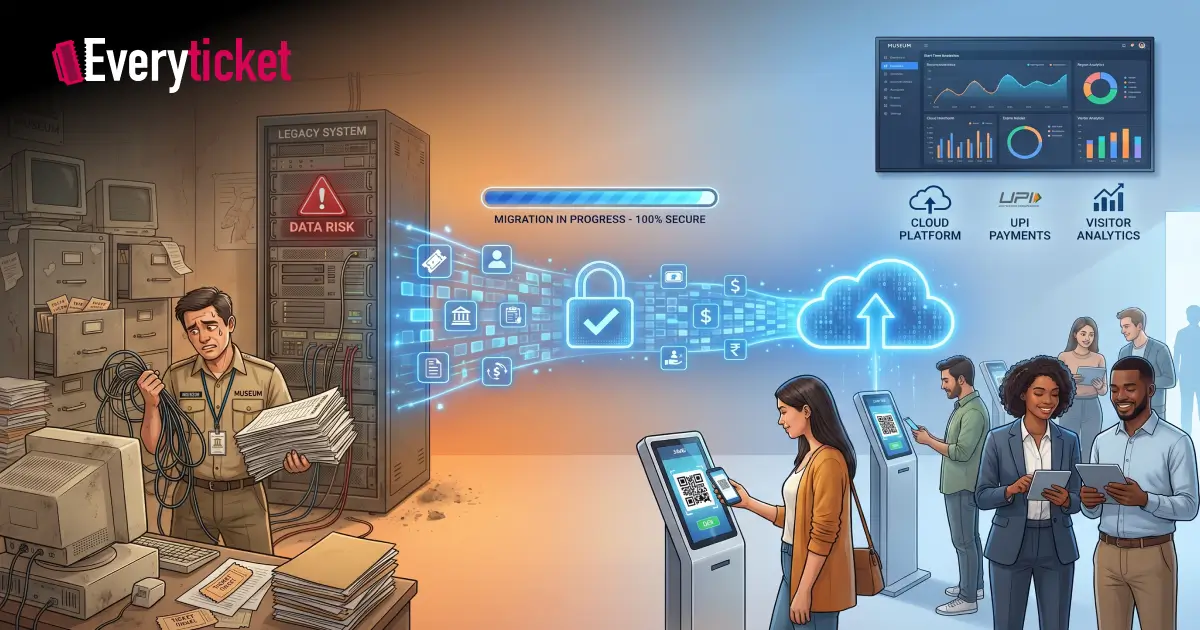
I have managed migration projects for museums that were stuck on old ticketing systems. Paper registers, disconnected counters, and Excel sheets held together with tape. The fear in every meeting was the same: “What happens to our data?”
That fear is valid. For museums, a failed migration means lost visitor records, revenue discrepancies, and operational downtime during peak season.
Here, I have broken down exactly how to switch your online ticketing system without losing a single record.
Why Museums Are Outgrowing Their Legacy Ticketing Software
Most museums in India still operate on outdated, locally installed software. These systems were built for a different era. They handled counter sales and printed paper tickets. That was sufficient a decade ago. It is no longer enough.
Here is what legacy systems fail to deliver today:
- No online booking capability. Visitors expect to book from their phones. Legacy museum management software does not support web or mobile transactions.
- No UPI or digital payment support. Cash-only counters turn away tourists who prefer digital wallets. Modern digital payment integration is now a baseline requirement.
- Siloed data. Walk-in sales and online bookings sit in separate databases. Staff reconcile numbers manually every evening.
- No visitor analytics. Without real-time dashboards, decisions around staffing and pricing are based on guesswork.
- Compliance gaps. Indian tax regulations require automated GST tracking. Manual entries increase audit risk.
The Ministry of Culture’s Gyan Bharatam Mission, launched in 2025, is pushing museums toward comprehensive digitization. Government museums and private institutions alike need digital ticketing solutions that align with this national mandate.
The Pre-Migration Audit: What Every IT Head Must Check First
I have seen migrations fail because teams jumped straight to installing new software. The real work starts before any installation.
Inventory Your Existing Data
List every data category your current online ticketing system holds. This includes ticket sales records, visitor demographics, membership data, pricing structures, staff access logs, and financial reports. Document the format, volume, and storage location for each.
Assess Your Hardware and Network
Many heritage buildings in India have inconsistent internet connectivity. Thick walls block wireless signals. Your new museum management software must support offline-ready operations that sync automatically when connectivity returns.
Map Your Integrations
Identify every system connected to your current setup. POS terminals, payment gateways, accounting software, CRM tools. Each integration point needs a corresponding connection in the new system. Modern API-driven platforms simplify this process significantly.
Evaluate Staff Readiness
Migration is a people problem as much as a technology problem. Counter staff, finance teams, and administrators all need training on the new platform. Factor training time into your migration timeline.
The 5-Step Migration Framework That Protects Your Data
I follow this sequence for every museum migration project. It eliminates guesswork and keeps data intact at every stage.
Step 1: Data Audit and Cleansing
Export all records from the legacy system. Review them for duplicates, incomplete entries, and outdated formats. Museums accumulate years of inconsistent data. A visitor record from 2015 may use a different naming convention than one from 2024. Standardize everything before transfer.
Step 2: Build the Target Environment
Set up the new online ticketing system in a staging environment. Configure ticket categories, pricing rules, staff permissions, and payment gateway connections. This mirrors your production setup without affecting live operations.
Step 3: Run a Parallel System
Operate both old and new systems simultaneously for a defined period. I recommend two to four weeks. All new transactions go into the new digital ticketing solutions platform. Historical data is imported and validated against the source.
Step 4: Validate With Checksums
Compare record counts between source and target systems. Use checksum validation to confirm no records were altered or lost during transfer. Verify that financial totals match. Test every ticket category, discount rule, and payment method. This is where most migration projects cut corners. Do not skip it.
Step 5: Cutover and Decommission
Once validation is complete, switch fully to the new system. Retain read-only access to the old database for 90 days. This gives your finance and audit teams a safety net. After 90 days, archive the legacy data and shut down the old system.
How to Achieve Zero Downtime During the Switch
Museum operations cannot stop for a software upgrade. Visitors arrive every day. Revenue must continue.
Schedule the Cutover Strategically
Plan the final switch during your lowest-footfall period. For most museums, this falls on a weekday in the off-season. Avoid holidays, school vacation periods, and festival weeks.
Use Cloud-Based Digital Ticketing Solutions
Cloud platforms eliminate dependency on local servers. Your team manages bookings, POS, and reports from any device. Updates happen automatically. There is no hardware to install or maintain. This is critical for institutions that need a complete ticketing system across multiple touchpoints.
Keep Offline Fallback Active
During cutover week, ensure every counter terminal has offline transaction capability. If the network drops, sales continue locally and sync once connectivity is restored. This is a non-negotiable feature for any museum management software deployed in heritage structures.
What to Monitor in the First 30 Days After Migration
The migration does not end at cutover. The first month is your observation period.
Track These Metrics Daily
- Record counts: Do ticket totals in the new system match your expected daily averages?
- Revenue reconciliation: Does the dashboard total match your bank settlement reports?
- Staff adoption: Are all counter operators using the new system correctly?
- Visitor feedback: Are online booking confirmation emails delivering properly?
Fix Issues Immediately
Small discrepancies grow into large problems if left unresolved. Assign one team member as the migration owner for the first 30 days. This person reviews reports, escalates issues, and coordinates with the software provider.
I have documented the broader IT infrastructure considerations for museums undertaking this kind of transition separately. It covers network setup, security protocols, and scalability planning.
How EveryTicket Supports a Smooth Migration for Museums
We built EveryTicket specifically for museums. Our platform has handled 115,000+ tickets and 54,000+ online bookings for institutions like MAP Bangalore, where we reduced entry times by 60% and increased membership sales by 30%.
Here is what makes our online ticketing system migration-ready:
- 60-minute go-live setup. Our team configures your account, imports your data, and gets your digital ticketing platform operational within one hour.
- API-driven data import. We extract and transform records from your legacy museum management software into our cloud database without manual re-entry.
- Built-in UPI, card, and cash support. All payment methods work from day one. No separate gateway setup required.
- Staff training included. Every plan includes onboarding sessions so your team operates confidently from the first day.
- GST-compliant reporting. Automated tax calculations and audit-ready financial exports are standard across all digital ticketing solutions we offer.
- Offline-ready POS terminals. Counter sales continue without interruption, even during network outages.
If your museum is considering a switch from legacy software, schedule a free migration consultation with our team. We will assess your current system, map your data, and build a migration plan specific to your institution.
Conclusion
Switching your online ticketing system does not have to mean risking your data or your operations. A structured, phased approach protects every record, every transaction, and every visitor relationship your museum has built over the years.
The key steps are straightforward. Audit your data. Clean it. Run parallel systems. Validate everything. Cut over during low-traffic periods. Monitor for 30 days.
Museums across India are under pressure to modernize, and the institutions that plan their migration carefully are the ones that succeed. Digital ticketing solutions are the foundation. A proper migration strategy is the path to get there. Museum management software built for this purpose makes the transition faster, safer, and permanent.