I have helped museums go from paper counters to fully operational digital ticketing for museum operations in under a month. The biggest concern I hear from operations heads is always the same: the implementation process would take six months, minimum.
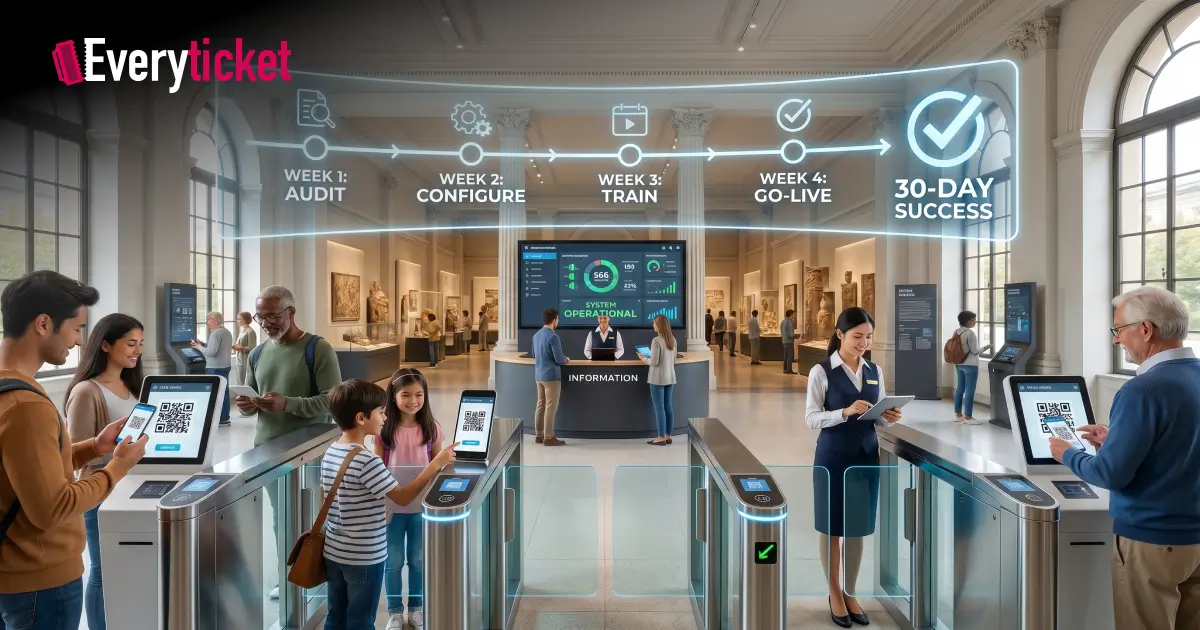
It does not have to. A museum entry management system can be fully deployed in 30 days when the implementation follows a clear, phased schedule. I have broken this process into a week-by-week playbook based on real deployments at institutions across India.
The Museum Grant Scheme by the Ministry of Culture actively funds museum modernization and digitization. Government and private museums alike are expected to submit action plans with defined timelines. This playbook gives you that timeline.
Week 1: Why Most Implementations Stall Before They Start
The number one reason museum ticketing system rollouts drag beyond 90 days is a missing pre-implementation audit. Teams jump into software installation without mapping their current operations.
Here is what Week 1 must cover.
Days 1 to 3: Operations Audit
- Document every ticket category your museum sells: general admission, student, senior citizen, foreign national, group, complimentary
- List all active payment methods, including cash, UPI, and card terminals
- Record daily footfall averages for peak and off-peak seasons
- Identify how many counter terminals and staff members handle ticketing
Days 4 to 5: Infrastructure Check
- Test internet connectivity at every counter location and entry gate
- Confirm that existing POS hardware supports digital integration
- For heritage buildings with inconsistent Wi-Fi, verify that the new museum entry management system supports offline POS operations with auto-sync
Days 6 to 7: Data Export
- Export all historical visitor records, membership data, pricing structures, and financial reports from your legacy system
- Standardize naming conventions and remove duplicate entries
- If your museum is switching from legacy software, a structured data migration process prevents record loss during transfer
Week 1 produces a complete site-readiness report. Every decision in the next three weeks depends on this.
Week 2: The Configuration Sprint That Sets Everything Up
With the audit complete, Week 2 is where the museum ticketing system gets configured to match your exact operational needs.
Days 8 to 10: Platform Setup
- Create ticket categories with pricing rules for each visitor segment
- Configure GST-compliant billing to meet Indian tax requirements
- Set up staff accounts with role-based access permissions
- Enable custom branding so the booking portal matches your museum’s visual identity
Days 11 to 12: Payment Gateway Integration
- Connect UPI and card payment systems to the ticketing platform
- Test each payment method with sample transactions
- Verify that settlement reports match bank records
Days 13 to 14: Online Booking Activation
- Launch the digital ticketing for museum admissions through a branded web portal
- Enable timed-entry slots to control visitor flow during peak hours
- Configure booking confirmation emails and SMS notifications
- Link online and onsite sales channels into one unified dashboard
By the end of Week 2, your museum entry management system is fully configured and ready for internal testing.
Week 3: Staff Training and Controlled Testing That Prevent Launch-Day Failures
Software is only as effective as the people using it. Week 3 focuses entirely on training and validation.
Days 15 to 17: Counter Staff Training
- Train every ticket counter operator on the new POS interface
- Run practice transactions for each ticket type, payment method, and discount category
- Assign a floor supervisor at each counter location to handle exceptions during the first week of live operations
Days 18 to 19: Admin and Finance Training
- Walk finance teams through revenue dashboards, settlement reports, and GST export features
- Show administrators how to add new ticket categories, update pricing, and manage staff permissions
- Review the key features each team member will use daily
Days 20 to 21: Parallel Run
- Operate both old and new systems simultaneously for at least two days
- Compare ticket counts, revenue totals, and visitor records between the two
- Fix any discrepancies immediately before proceeding to full cutover
A parallel run is the most reliable way to validate a museum ticketing system before going live. Skip it, and you risk financial mismatches on Day 1.
Week 4: Go-Live and the 7-Day Monitoring Window That Secures Your Investment
The final week is about controlled launch and close observation.
Day 22: Full Cutover
- Switch all ticketing operations to the new digital ticketing for museum platform
- Deactivate legacy system for new transactions but retain read-only access for 90 days
- Schedule the cutover on a low-footfall weekday to reduce risk
Days 23 to 25: On-Site Monitoring
- Station a technical support person at the museum during operating hours
- Track daily ticket counts against historical averages
- Monitor online booking conversion rates and payment success rates
Days 26 to 28: Visitor Feedback Collection
- Collect feedback from walk-in visitors and online bookers
- Identify any friction points at entry gates or counter terminals
- Adjust timed-entry slot durations or ticket categories based on real usage data
Days 29 to 30: Performance Review
- Generate a 30-day implementation report covering ticket volume, revenue reconciliation, staff adoption rate, and system uptime
- Benchmark against pre-implementation metrics from the Week 1 audit
- If your museum plans to add self-service kiosks, this report provides the data to justify the next phase
The American Alliance of Museums recommends that museums adopt technologies suited to their specific goals and audiences. A 30-day deployment achieves this without the operational disruption of a six-month rollout.
What EveryTicket Delivers Within This 30-Day Window
We built EveryTicket specifically for museums, and our implementation process follows the exact timeline above. Our platform includes a digital ticketing platform, POS, self-service kiosks, and an all-in-one admin panel that work together from Day 1.
Here is what we bring to the table.
- Processing track record: Over 150,000 tickets processed and 54,000+ online bookings completed across museum deployments, including MAP Bangalore
- Staff training included: Every plan covers one-time staff training at no additional cost
- GST-compliant billing: Built for Indian tax requirements with automated reporting
- UPI, card, and cash support: Integrated payment gateways through Pine Labs and PayU
- Transparent pricing: Plans start at ₹7,000 per month with no hidden onboarding charges on Custom plans
If your museum needs a museum entry management system running within 30 days, book an implementation call with our team, and we will map the timeline to your specific requirements.
Conclusion
A 30-day implementation of digital ticketing for museum operations is achievable when the process is structured into four clear phases: audit, configure, train, and launch. I have seen museums go live within this window and start collecting actionable visitor data from Day 1.
The key is preparation. A thorough Week 1 audit eliminates the delays that push most museum ticketing system deployments past the 90-day mark. Pair that preparation with a platform built for museum-specific workflows, and the 30-day target becomes a repeatable standard.
FAQs
Can a museum entry management system really go live in 30 days?
Yes. With a structured four-week implementation covering audit, configuration, training, and launch, museums can go fully operational within 30 days.
What infrastructure does a museum need before implementing digital ticketing?
Museums need stable internet at counter points, compatible POS hardware, and exported historical data from their existing ticketing setup.
Does a museum ticketing system support both online and walk-in ticket sales?
Yes. Modern platforms unify online bookings and on-site counter sales into a single dashboard with real-time inventory sync.
How does digital ticketing for museum admissions handle GST compliance in India?
Compliant platforms auto-calculate GST on every transaction and generate tax-ready settlement reports for audit and filing purposes.
What happens if internet connectivity drops during museum operating hours?
Offline-capable systems continue processing tickets locally at POS counters and sync all data automatically when connectivity restores.